Adding a reading profile
DASexplorer is interrogator-agnostic: support for a new acquisition system is added through a reader function plus a profile entry in config.json, without touching the rest of the application. This makes it straightforward to add new readers gradually, including contributions from the community.
Not sure what a reading profile is? See What is a reading profile?
Step 1 — Write a reader function
A reader function takes the path to a file and returns a DASDataset object. The standard signature is:
def read_myreader_v1(
    path: str,
    stride: Optional[int] = None,
    read_dmin_m: Optional[float] = None,
    read_dmax_m: Optional[float] = None,
    **kwargs,
) -> DASDataset:
The DASDataset must contain at least:
| Field | Type | Description |
|---|---|---|
tr |
np.ndarray |
Strain-rate array, shape (n_channels, n_time) |
dist_m |
np.ndarray |
Along-cable distance axis [m] |
time_s |
np.ndarray |
Time axis relative to file start [s] |
fs_hz |
float |
Sampling frequency [Hz] |
start_datetime_utc |
datetime \| None |
UTC timestamp of the first sample |
filename |
str |
Original file name (basename only) |
reader |
str |
Reader key — must match the key used in READERS and config.json |
downsample |
int \| None |
Channel stride applied at load time, or None |
channel_offset |
int |
Index of the first loaded channel in the original cable (stride=1, no crop). Use 0 if no spatial crop is applied. |
metadata |
dict |
Any additional format-specific information |
units |
str |
Physical units of tr (e.g. "nanostrain", "DC", "rad/(s*m)") |
A minimal reader looks like this:
def read_myreader_v1(
    path: str,
    stride: Optional[int] = None,
    read_dmin_m: Optional[float] = None,
    read_dmax_m: Optional[float] = None,
    **kwargs,
) -> DASDataset:

    # ... Your reading logic here ...

    return DASDataset(
        tr=tr,
        dist_m=dist_m,
        time_s=time_s,
        fs_hz=fs_hz,
        start_datetime_utc=start_dt,
        filename=os.path.basename(path),
        reader="myreader_v1",
        downsample=downsample,
        channel_offset=channel_offset,
        metadata={"key": "value"},
        units="nanostrain",
    )
Save the reader in core/readers_lib/ alongside the other reader modules. Use a descriptive filename such as myinterrogator.py.
Tip
Not sure where core/readers_lib/ lives on your system? Run:
python -c "import dasexplorer, os; print(os.path.join(os.path.dirname(dasexplorer.__file__), 'core', 'readers_lib'))"
pip install -e . from a local clone). See Installation — with git.
Step 2 — Register your reader
Open core/readers.py and add two lines: one import and one entry in the READERS dictionary.
from dasexplorer.core.readers_lib.myinterrogator import read_myreader_v1 # Add this

READERS = {
    "hdas2.5_v1":   read_hdas25_v1,
    "optasense_v1": read_optasense_v1,
    # ...
    "myreader_v1":  read_myreader_v1,   # Add this
}
READER_TYPES and READER_LABELS are derived automatically from READERS and config.json — no additional lists to maintain.
Step 3 — Add a profile to config.json
Add an entry under "profiles" in config.json. You can do this in two ways:
- From the GUI: go to Settings → Configuration Profiles, duplicate an existing profile, rename it and edit its fields.
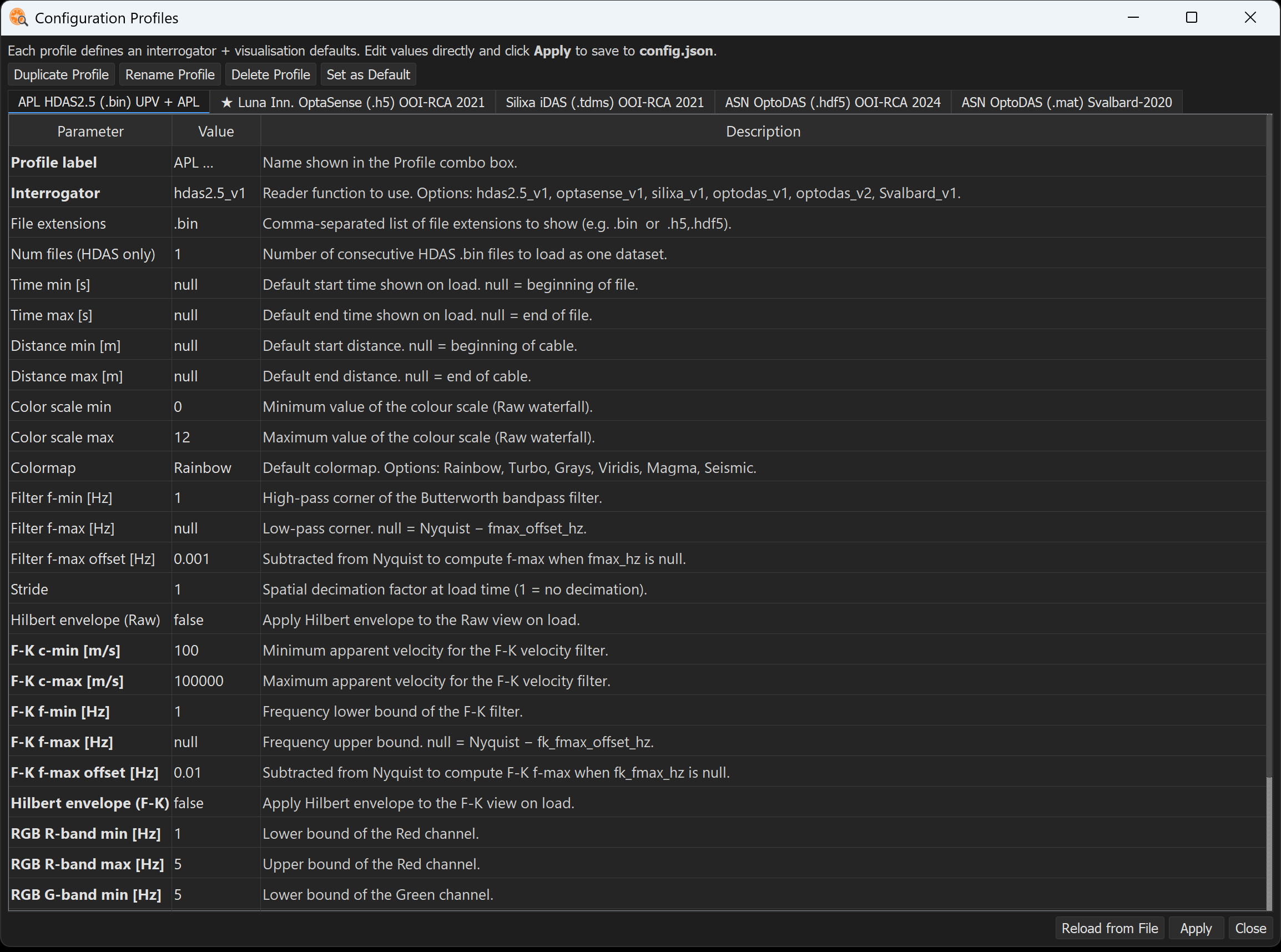
- By editing
config.jsondirectly.
config.json
"myreader_v1": {
    "label": "MyInterrogator (.ext) Description",
    "reader": "myreader_v1",
    "file_extensions": [".ext"],
    "tmin_s": null,
    "tmax_s": null,
    "dmin_m": null,
    "dmax_m": null,
    "read_dmin_m": null,
    "read_dmax_m": null,
    "vmin": 0.0,
    "vmax": 0.5,
    "colormap": "Rainbow",
    "fmin_hz": 1.0,
    "fmax_hz": null,
    "fmax_offset_hz": 0.01,
    "stride": 1,
    "envelope": false,
    "fk_cmin_ms": 1400.0,
    "fk_cmax_ms": 3500.0,
    "fk_fmin_hz": 1.0,
    "fk_fmax_hz": null,
    "fk_fmax_offset_hz": 0.01,
    "fk_envelope": false,
    "default_view": "raw",
    "rgb_rmin_hz": 1.0,
    "rgb_rmax_hz": 10.0,
    "rgb_gmin_hz": 10.0,
    "rgb_gmax_hz": 30.0,
    "rgb_bmin_hz": 30.0,
    "rgb_bmax_hz": 50.0,
    "rgb_percentile": 90.0
}
The "reader" field must match the key used in READERS exactly.